In today’s digital landscape, online privacy and automation are not optional — they’re essential. Whether you want to browse anonymously, access geo-restricted content, or perform large-scale data extraction securely, proxies are the key.
This guide covers everything you need to know about proxies — what they are, the different types available, how they’re used in real-world scenarios, and how to set them up using Nstproxy, a trusted and high-performance proxy provider. You’ll also learn how to configure proxy authentication and use tools like curl for testing.
How Proxies Work
When your device connects to the internet, your requests normally go straight to a website or app. With a proxy, these requests are first routed through an intermediary server that hides your IP address.
This offers several benefits:
- Anonymity: Keeps your real identity private.
- Geo-Unblocking: Access region-locked content.
- Stealth & Protection: Avoid detection during scraping, automation, or multi-account management.
Understanding Residential Proxies
Why They Matter
- Authenticity: Residential IPs come from real ISP users, making your traffic look genuine.
- Lower Block Rates: Harder for websites to detect or ban.
- Ideal for Sensitive Tasks: Useful for social media automation, ad verification, web scraping, or competitor monitoring.
Nstproxy, for example, provides access to over 110 million residential IPs across 195+ countries, with automatic IP rotation to ensure your connections remain secure and undetectable.
Types of Proxies
Each type of proxy serves a specific purpose. Here’s a breakdown:
1. Residential Proxies
- Source: Real users via ISPs
- Best For: Stealth scraping, social media, ad verification
- Pros: High authenticity, low detection risk
- Cons: More expensive
2. Datacenter Proxies
- Source: Hosting providers
- Best For: Bulk scraping, automation tasks
- Pros: Fast, affordable
- Cons: Easier to detect
3. Rotating Proxies
- Feature: Automatically change IPs per request/session
- Best For: Large-scale scraping and avoiding bans
- Pros: High scalability
- Cons: May cause brief instability
4. IPv4 Proxies
- Format: Standard IP version
- Pros: Broad compatibility, stable
- Cons: Costlier due to IPv4 scarcity
5. IPv6 Proxies
- Format: Newer IP protocol
- Pros: Extremely cheap in bulk
- Cons: Limited support on some websites
6. Backconnect Proxies
- Feature: Rotate IPs in the background automatically
- Best For: Long-term automation and continuous scraping
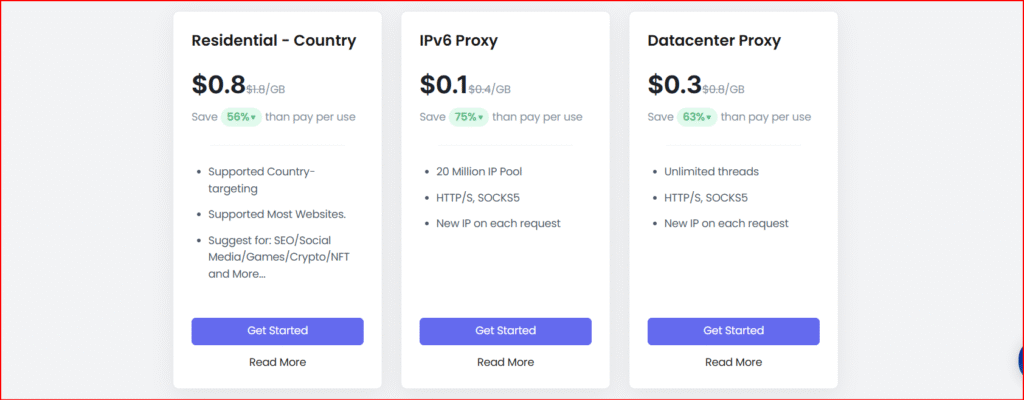
Proxy Comparison Chart (Nstproxy Pricing)
| Type | Best For | Pros | Cons | Starting Price |
|---|---|---|---|---|
| Residential | SEO, scraping, monitoring | Real IPs, hard to detect | Higher cost | $0.80/GB (IPv4) |
| Datacenter | Bulk scraping, bots | Fast, affordable | Easier to flag | $0.30/GB |
| Rotating | Large-scale scraping | Auto IP rotation | Occasional instability | Free trial |
| IPv6 | Budget scraping | Millions of IPs | Limited support | $0.10/GB |
💡 Tip: Choose residential proxies for stealth and account safety. Go with datacenter or IPv6 proxies for speed and scale when detection isn’t a major concern.

Finding Your Proxy Address
Proxy credentials are usually formatted like this:
- Without Authentication:
proxy.server.com:port - With Authentication:
username:password@proxy.server.com:port
You can find or generate these in your proxy provider’s dashboard — for example, Nstproxy’s Proxy Generator Tool simplifies this process.
Residential vs. Datacenter Proxies
| Feature | Residential Proxy | Datacenter Proxy |
|---|---|---|
| IP Source | Real home users (ISPs) | Hosting servers |
| Detection Risk | Very low | Moderate–high |
| Speed | Moderate | Very fast |
| Cost | Higher | Lower |
| Best For | Stealth, account management | Bulk scraping, automation |
If your goal is avoiding bans or managing sensitive accounts, go with residential proxies. For high-volume scraping where occasional blocks are acceptable, datacenter proxies are faster and more cost-effective.
Getting Started with Nstproxy
- Create an Account: Visit nstproxy.com and sign up.
- Top Up Your Wallet: Add funds — plans start as low as $X/GB.
- Create a Proxy Channel: Choose your region, rotation type, and click Create Channel.
- Start Using Proxies: Copy the credentials from the Proxy Generator Tool and integrate them with your application, browser, or via command-line tools like
curl.
Why Choose Nstproxy?
✅ Global Coverage: 195+ countries, 8,000+ cities
✅ Smart IP Rotation: Avoid bans and CAPTCHAs
✅ 99.99% Uptime: Reliable infrastructure
✅ Tool Compatibility: Works with anti-detect browsers and popular scraping tools
✅ Easy Dashboard: Manage and deploy proxies instantly
Whether you’re scraping prices, running marketing automation, or accessing geo-blocked content, Nstproxy delivers speed, reliability, and anonymity at scale.
Final Thoughts
Proxies aren’t just privacy tools — they’re an essential asset for marketers, developers, and data-driven professionals. By choosing the right proxy type and leveraging a trusted provider like Nstproxy, you can make your workflows faster, safer, and more efficient.
Ready to see the difference? Start your free trial today and experience Nstproxy in action.
Frequently Asked Questions
Q: What is a proxy server?
A proxy acts as an intermediary between you and the web, masking your IP for privacy and security.
Q: How can I test if my proxy works?
Use curl or visit whatismyip.com while connected to check your visible IP.
Q: Which is better — residential or datacenter proxies?
Residential for stealth and safety; datacenter for speed and cost-efficiency.
Q: Does Nstproxy offer a trial?
Yes, you can test residential proxies through their free trial.
Q: Can I integrate Nstproxy with automation tools?
Absolutely. Nstproxy supports popular platforms like Dolphin Anty, Multilogin, and custom scripts.
About the Author